
What Is Salesforce Headless 360?
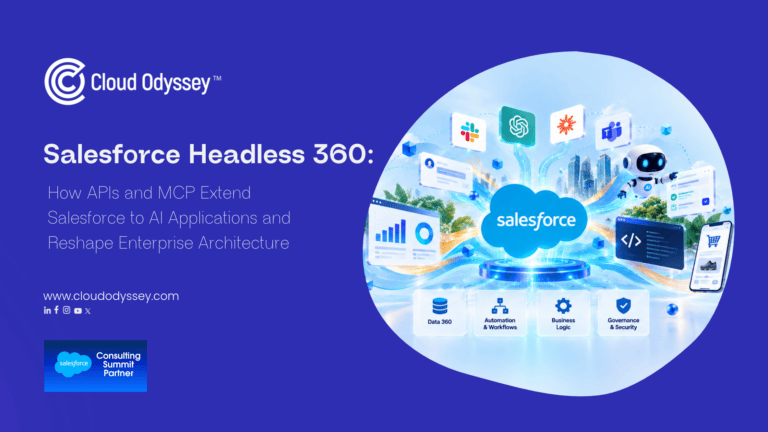
Salesforce Headless 360 is an architecture that exposes Salesforce capabilities as APIs, Model Context Protocol (MCP) tools, and CLI commands, so AI agents, apps, and developer tools can use the platform without a browser. Salesforce announced it at TDX 2026. On its Headless 360 product page, the company describes it as a way to make the browser optional while keeping the data, workflows, and business logic that organizations built over 25 years. Salesforce now labels the same offering “Headless Toolkit” on that page, so you will see both names in search results and documentation.
The word “headless” means the front end is separated from the back end. In a headless CRM, the screen is one way to reach your data and logic. An AI agent, a Slack thread, a mobile app, or a command line can be another.
Salesforce says the release includes 60+ MCP tools, 30+ preconfigured coding skills, 4,000+ APIs, and 220+ CLI commands, as listed on the Salesforce Developers blog. Lightning and the browser stay in place. Salesforce states that human users do not need to give up the traditional interface.
For the wider Salesforce AI product range, see the Salesforce India site.
How Do APIs and MCP Extend Salesforce to AI Applications?
APIs and MCP give AI applications a governed way to read Salesforce data and trigger Salesforce actions. APIs handle the request. MCP lets an AI client discover which tools exist and how to call them, with no custom integration code written in advance.
Three access paths: APIs, MCP tools, and CLI commands
Headless 360 offers three ways in, and each one fits a different job:
| Access path | Who uses it | Typical use |
| APIs (REST, GraphQL, Metadata and others) | Developers and integration platforms | Apps, middleware, and mobile front ends that read and write records |
| MCP tools | AI agents and AI clients such as Claude, ChatGPT, and Cursor | Agents that look up a case, log a call, or update an opportunity |
| CLI commands | Developers and coding agents | Scaffolding, testing, and deploying through a DevOps pipeline |
Salesforce developers have built headless for years, through Experience Cloud sites with React front ends and Node.js apps over REST. The change is the caller. An AI model can now find and combine capabilities at runtime.
Two kinds of MCP tools: coding agents and business agents
Salesforce separates MCP tools by consumer. MCP tools for coding agents connect tools such as Claude Code or Cursor to an org, so they can read metadata, generate Apex, run tests, and deploy. MCP tools for business agents let end users and autonomous agents reach Salesforce from Slack, ChatGPT, Claude, or any MCP-compatible client.
Both share one trust layer. The difference is who calls the tool and why. Your architecture needs a plan for each.
Hosted MCP servers and the Headless 360 MCP server
Salesforce made its Hosted MCP Servers generally available in April 2026. The Headless 360 MCP Server followed in beta in July 2026. A few facts matter for planning:
- Every Hosted MCP transaction runs as the authenticated user, scoped through an External Client App with the mcp_api scope. If a user cannot do something in Salesforce, the agent cannot do it through MCP.
- The Headless 360 server covers all of Salesforce. The Data 360 MCP server covers Data 360 data only.
- The Hosted MCP Servers overview states that the service targets customers with Flex Credits and may be billed for usage. Check this with your Salesforce account team before you commit to a rollout.
- Salesforce keeps a running list of changes in the Headless 360 release notes on Salesforce Help.
What Does Headless 360 Mean for Enterprise Salesforce Architecture?
Headless 360 moves Salesforce from a single application with a built-in interface to a shared capability layer that many clients call. Architects must plan for more entry points, schema-level governance, and agent-specific testing.
A four-layer view: experience, access, execution, and data
A useful way to draw the new architecture is in four layers:
- Experience layer. Lightning, Slack, Teams, WhatsApp, ChatGPT, Claude, custom React apps, and mobile.
- Access layer. APIs, MCP servers, and CLI commands, secured by OAuth and External Client Apps.
- Execution layer. The business logic you already own: flows, Apex, validation rules, approvals, and sharing rules.
- Data layer. Salesforce objects plus Data 360 for unified customer data.
In the old model, layers one and three were tightly bound. In the headless model, layer three has to stand on its own, because any client can reach it.
| Dimension | Traditional Salesforce | Headless 360 |
| Main consumer | A person in the Lightning UI | Any authenticated caller: person, agent, app, or CLI |
| Who writes code | A developer from start to finish | A developer plus a coding agent, with human review gates |
| Channel strategy | One UI build per channel | One capability definition, rendered on many surfaces |
| Governance anchor | UI rules plus schema rules | Schema-level enforcement |
Governance moves from the screen to the schema
This is the change that will catch teams off guard. When the UI was the only door, a page layout or a hidden button could limit what people did. An agent never sees a page layout.
The Salesforce Developers blog is direct on this point: with no UI as the main surface, you need full schema-level enforcement through validation rules, the sharing model, and Apex. Salesforce lists four controls that apply to every API call, MCP tool call, and CLI command: identity, access, invocation scope, and governance. Validation rules, triggers, approval chains, and governor limits fire whatever the entry point.
In practice, ask these questions in your architecture review:
- Does every critical rule live in the schema, or does some of it live only in a page layout or a Lightning component?
- Do permission sets follow least privilege, and do they work for an agent acting as a specific user?
- Which actions should an agent be allowed to call, and which should stay human-only?
- Where do approvals sit for high-risk actions such as discounts, refunds, or record deletion?
Headless Experience Layer and multi-framework: one capability, many surfaces
The Headless Experience Layer separates a capability from the place it appears. A team defines a UI fragment once, and the layer renders it as a Slack block, a mobile card, or a ChatGPT response. Salesforce Multi-Framework lets React developers build on the platform with native authentication and security, which widens the hiring pool beyond LWC specialists.
Salesforce says the build-time side is mature, and the runtime side already handles simple cases such as a case summary in a Slack thread. Broader surfaces, such as voice, are still part of the roadmap. Plan around what ships today.
Testing and observability change too
Testing an agent differs from testing Apex. You judge whether the agent’s reasoning led to an acceptable result across many inputs. Salesforce points to session tracing, custom scoring evaluations, and the Agentforce Testing Center for this work. Add these to your release process before agents touch production data.
Where Do MuleSoft and Data 360 Fit in a Headless Salesforce Architecture?
Data 360 supplies unified customer context, and MuleSoft supplies governed access to the systems outside Salesforce. Together they give an agent the full picture without a pile of point-to-point connections.
Most enterprise workflows cross more than one system. A quote approval may need ERP stock levels. A service case may need order history from a legacy platform. Salesforce’s Headless 360 MCP servers cover the Salesforce side. The rest of the estate still needs an integration layer.
MuleSoft API-led connectivity fits here. Your System, Process, and Experience APIs can serve a second consumer, which is an AI agent. MuleSoft MCP servers, surfaced through API Catalog, let Agentforce find and call those APIs. Our team covered the control side in Why MuleSoft Agent Fabric Is the Foundation for Secure Enterprise AI Integration, and the migration side in Implementing the Strangler Design Pattern Using MuleSoft APIs.
For customer context, Data 360 (Data Cloud) implementation gives agents one profile to reason over, so they do not stitch together records from five sources.
What Are Real Examples of Headless 360 in Use?
Salesforce lists several customer stories on its Headless 360 page. Engine reports cutting agent development from months to 12 days by decoupling logic from the UI. Indeed describes building, testing, and deploying production agents without opening a browser. BACA Systems, a 50-person robotics manufacturer, says it runs its whole business on headless capabilities. These are vendor-published stories, so treat the numbers as a reference point and run your own pilot to get your own.
On the Cloud Odyssey side, our CurrencyFair story shows how the company streamlined customer query handling with Salesforce Agentforce. Our post on how Agentforce turns Slack into an AI revenue operations assistant covers a second agent use case.
Is Headless 360 Right for Your Organization?
Headless 360 fits organizations that plan to run AI agents against Salesforce, support several channels, or want coding agents in their DevOps flow. It is a weaker fit if your org has weak data quality, loose permissions, or little documentation.
Salesforce itself says the investment matters most for teams moving toward an agentic enterprise. It is not an all-or-nothing move. Start where the signal is strongest:
- Ready now: clean data model, enforced validation rules, documented flows, a working DevOps pipeline.
- Fix first: permission sets that grant broad access, business rules held in page layouts, undocumented custom code, unclear data ownership.
An independent Salesforce CRM health check is a quick way to see which list your org belongs on.
How to Start with Salesforce Headless 360: A Five-Step Plan
- Pick one workflow. Choose a task your operations team has complained about for a long time, such as case summaries, quote status, or field service updates. Avoid the most impressive demo.
- Audit the schema. Move critical rules out of the UI and into validation rules, sharing settings, and Apex.
- Set up a sandbox connection. Activate a Hosted MCP Server in a sandbox, create the External Client App, and connect one client such as Claude or Cursor. Salesforce’s Try Headless 360 workshop walks through it.
- Define agent identity and limits. Decide which user each agent acts as, which tools it may call, and where a human must approve.
- Test, trace, and measure. Use evaluation sets and session tracing, then compare cycle time and error rates against the manual process.
If you want a partner for the build, our Salesforce implementation services and Agentforce practice cover this work, and our managed services team keeps it running after go-live.
Cloud Odyssey’s Point of View on Salesforce Headless 360
We have worked on Salesforce and MuleSoft since 2014, and Headless 360 reads to us as a confirmation of an idea we have held for a long time: the value in Salesforce sits in the logic and governance underneath the screen. Agents make that visible.
Three things shape our advice to clients:
- The boring work decides the outcome. Teams that have clean data, tight permissions, and documented automation will get value from MCP in weeks. Teams without them will get an agent that fails the first hard question from a stakeholder.
- Salesforce is not the whole estate. Real workflows touch SAP, NetSuite, legacy platforms, and partner systems. API-led design through MuleSoft is how those systems join the agent’s reach with proper control, and it is why we treat Headless 360 and integration as one design problem.
- Start small and keep a human in the loop. One workflow, one agent identity, one set of approval rules. Expand after the data shows it works. For the wider direction of travel, read our notes on Claudeforce by Salesforce and Anthropic and the Dreamforce 2026 key takeaways.
If you want a second opinion on your architecture, talk to our team. Our Salesforce consulting services start with a review of your current org and a short list of workflows worth converting first.
Frequently Asked Questions About Salesforce Headless 360
Salesforce Headless 360 makes Salesforce capabilities available as APIs, MCP tools, and CLI commands. AI agents and apps can use Salesforce data and business logic without a browser, and every call still follows your permissions and rules.
MCP, the Model Context Protocol, is an open standard that lets AI clients find and call external tools at runtime. In Salesforce, Hosted MCP Servers expose org capabilities to clients such as Claude, ChatGPT, and Cursor, and each call runs as the authenticated user.
No. Salesforce states that Lightning components and browser experiences are staying. Headless 360 adds more ways to reach the platform, such as Slack, Teams, mobile, voice, and AI agents.
Salesforce enforces identity, access, invocation scope, and governance on every API call, MCP tool call, and CLI command. Agents inherit sharing rules, field-level security, and validation rules. Your own schema and permission design still decide how strong that protection is.
The Headless 360 MCP Server works across all of Salesforce and has been in beta since July 2026. The Data 360 MCP Server works with Data 360 data only.
No. Headless 360 exposes Salesforce capabilities. MuleSoft connects and governs systems outside Salesforce, such as ERP and legacy platforms. Most enterprise agent workflows need both.
Salesforce’s Hosted MCP Servers documentation says the service is intended for customers with Flex Credits and that usage may be billed. Confirm current terms with your Salesforce account executive.