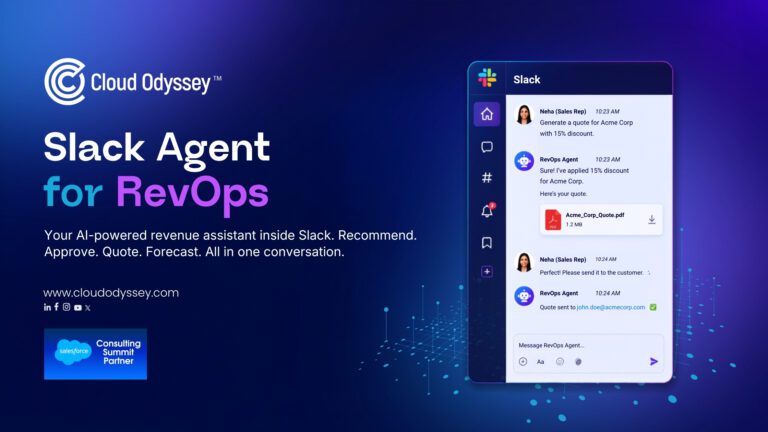

Revenue teams spend too much time switching between CRM systems, pricing tools, approval workflows and collaboration platforms. Every extra click slows down a customer conversation and eats into actual selling time. Salesforce Agentforce changes that by bringing enterprise AI directly into Slack, where revenue teams already spend their day.
Slack Agent for RevOps is an Agentforce powered AI assistant that connects Salesforce CRM and Revenue Cloud into Slack, so reps get product recommendations, automated discount approvals and instant quotes, while revenue leaders get live forecasts, all inside a normal Slack conversation, without logging into the CRM.
Why Revenue Teams Keep Losing Momentum to System Switching
Most revenue workflows are stitched together rather than designed. An opportunity lives in Salesforce Sales Cloud. Pricing rules live in a quoting tool or a spreadsheet someone maintains. Discount approvals travel by email or a separate queue. Slack sits on top of all of it as the place people talk about the work, without actually being able to do the work.
Each handoff between those systems is a small tax. On its own, none of it looks expensive. A minute here to check a pricing rule, two minutes there to find who has approval authority. In aggregate, across every quote a sales team touches in a quarter, that tax adds up to hours nobody tracks.
The cost that does show up is momentum. A customer asking for a better price mid conversation is not going to wait patiently while a rep tabs between four systems.
What an Agentforce RevOps Agent Actually Does Inside Slack
This is agentic AI applied to a specific, high friction workflow rather than a general purpose chatbot. Slack Agent for RevOps gives Slack the ability to read from and act on Salesforce CRM and Revenue Cloud data directly. In practice that comes down to four jobs, each triggered by a plain language question typed into a Slack thread.
- Recommending products based on account history, tier and existing subscriptions
- Validating and approving discount requests against pricing rules and approval authority
- Generating a finished quote document the moment a discount is approved
- Producing a revenue forecast from live pipeline data on request
The mechanics behind each of those jobs sit in the platform work that sits underneath an agent like this, which is what connects the conversational AI layer in Slack to the pricing and account data in Salesforce.
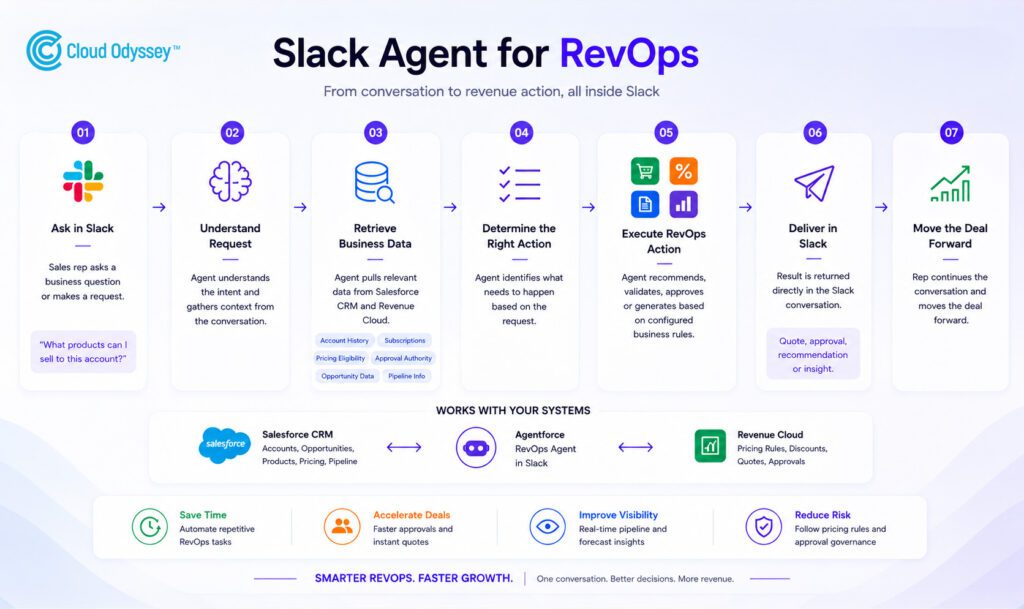
Entire workflow of Slack RevOps Agent built on Salesforce Agentforce and Salesforce Revenue Cloud
How Product Recommendations Get Grounded in Real Account Data
A recommendation is only useful if it reflects what an account can actually buy. The agent pulls purchase history, account tier, pricing eligibility and current subscriptions before it suggests anything, which rules out the two failure modes that make generic recommendation tools useless in a live sales conversation: suggesting a product the customer already owns, and suggesting one they are not eligible to buy at their current tier.
Ask it a plain question like “what products can I sell to this account,” and it returns a grounded answer in seconds, recommended products based on purchase history, alongside other relevant options the account has not yet adopted. The agent can also draw on trusted customer data from Salesforce Data Cloud to sharpen those recommendations further, unifying signals from across the business into a single, more relevant business insight rather than relying on Salesforce CRM records alone.
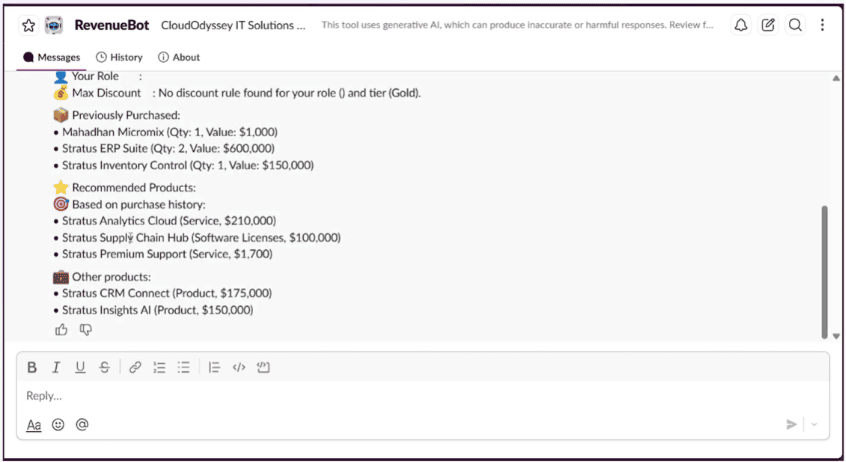
RevenueBot recommending Stratus Analytics Cloud, Stratus Supply Chain Hub and Stratus Premium Support based on account purchase history
Why Discount Approval Has to Be a Rules Engine, Not a Chat Reply
The riskiest part of any AI agent assisted quoting flow is discounting, because an approval that should not have happened is expensive in a way a bad product suggestion is not. The agent checks the rep’s approval authority, the account’s specific pricing terms, quote eligibility and discount thresholds, then either approves automatically or routes the request to the appropriate manager, inside the same Slack thread.
Revenue Cloud is designed to support this kind of large, multi step deal on a single platform, handling quoting, ordering, contracting and approvals together, according to Salesforce’s own Revenue Cloud documentation. That is what an Agentforce agent is actually calling into when it approves or escalates a discount in Slack.
Getting this right in a specific organisation is mostly about how the pricing and approval logic gets built in the first place.
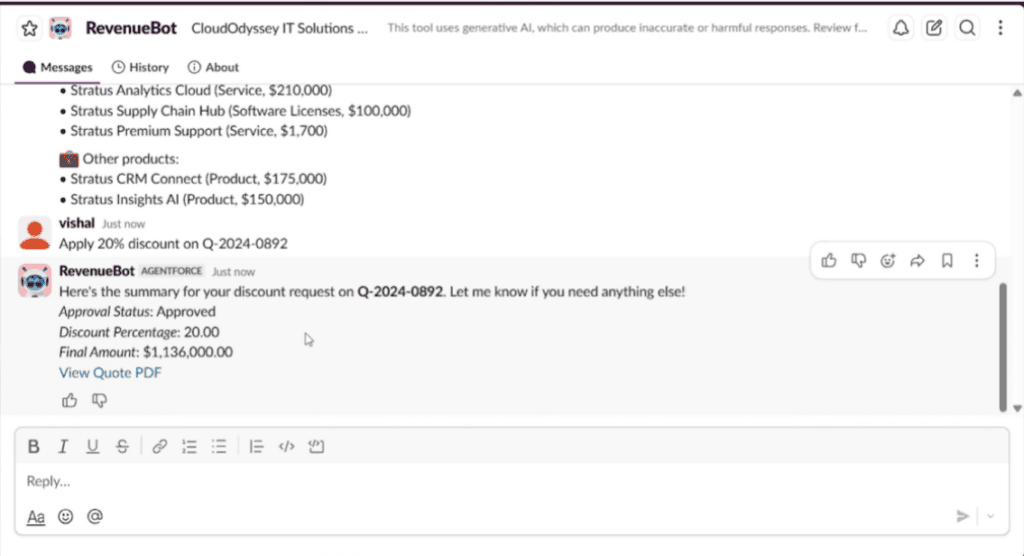
RevenueBot approving a 20 percent discount request and generating a quote inside Slack
What Makes Instant Quote Generation Different From Automated Quoting
Automated quoting has existed for years. What changes here is when the quote gets generated. Instead of a rep finishing a call, then going to build a quote afterward, the PDF is produced the moment a discount clears, updated pricing, subtotal, discount and final amount included, while the customer is still active in the conversation.
A quote generated twenty minutes after a call ends is a quote sent to a customer whose attention has moved elsewhere. A quote generated inside the same Slack thread reaches the customer while their intent to buy is still live, and it arrives as a finished, branded document rather than a raw number in a chat message.
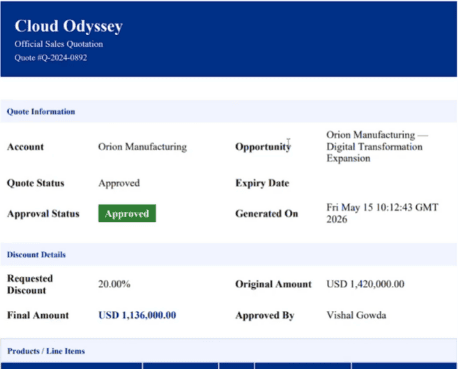
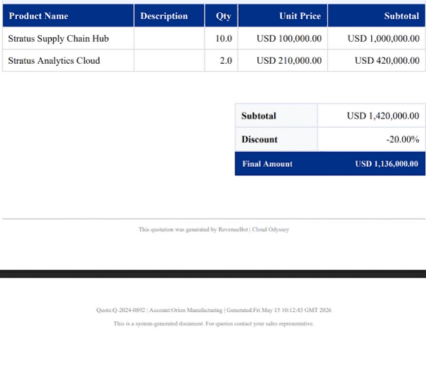
Generated sales quotation PDF showing approved 20 percent discount and final amount for Orion Manufacturing
Giving Revenue Leaders a Forecast Without a Report Request
A revenue manager asking for next quarter’s forecast normally means asking someone to pull opportunity data, apply weighting by stage and probability, and build something presentable. An Agentforce agent that reads live opportunity data, deal stage and pipeline probability collapses that lag to the length of a Slack question, flagging which deals look at risk along the way.
RevenueBot forecast response showing total forecasted revenue, monthly breakdown and pipeline risk flags
| Design point | CRM first workflow | Slack native RevOps agent |
| Where the rep starts | Opening Salesforce or a separate quoting tool | The Slack conversation already in progress |
| Where recommendations come from | A manual search across account records | A question typed inline, answered automatically |
| How a discount gets approved | Email or a separate approval queue | Automatic approval within authority, or automatic escalation |
| Where the quote lives | Generated in the CRM, shared manually | Generated as a PDF inside the same thread |
| What leadership does for a forecast | Requests a report and waits | Asks a question, gets pipeline data immediately |
Where Slack Native RevOps Agents Fail in Implementation
- Grounding recommendations in stale account data, so the agent recommends products a customer already owns or cannot buy at their tier
- Treating discount thresholds as a one time setup, when pricing policy shifts quarterly in most organisations
- Skipping the escalation path design, so the agent either blocks legitimate deals or approves discounts nobody meant to authorise
- Rolling out forecasting before recommendations and approvals are trusted, since reps who don’t trust the quoting side won’t trust the pipeline numbers either
- Leaving the rollout to IT alone, when revenue operations needs to own the approval logic
How to Know If It’s Actually Working
Adoption numbers alone are misleading, since a rep can open a Slack thread without trusting a single answer it gives. Watch discount approval cycle time first, it should drop noticeably once reps stop routing requests manually. Track escalation accuracy too, how often a manager actually approves what got escalated, since an agent that escalates too cautiously just creates a second queue. Forecast variance, the gap between what the agent predicts and what actually closes, is the slowest metric to move and the most important one, since it only tightens once reps trust the tool enough to keep their opportunity data current. Expect that to take a full quarter, not a launch week.
Cloud Odyssey’s Point of View
We have implemented Salesforce Agentforce across sales, service, and revenue workflows for clients ranging from manufacturing to financial services, and the pattern we keep seeing is this: agentic AI earns adoption fastest when it shows up inside a tool people already trust, not inside one more dashboard they have to remember to check. Revenue Cloud brings the pricing logic and approval rules; Agentforce brings the AI agent layer that lets a rep act on all of that without leaving Slack. Neither piece does much on its own; together, they turn a process that used to span multiple systems into a single conversation.
If your revenue team is still stitching together Salesforce CRM, spreadsheets, and Slack by hand, this is worth a closer look. See how a similar Agentforce deployment played out in our CurrencyFair success story, or talk to our team about a walkthrough tailored to your business.
Frequently Asked Questions
Agentforce in Slack lets teams bring AI agents directly into Slack conversations to access Salesforce data and take action without switching apps. For revenue teams specifically, this means getting product recommendations, discount approvals, quotes, and forecasts inside a normal Slack thread instead of logging into the CRM separately.
Yes, in most cases, for the approval and quoting functions. Revenue Cloud holds the pricing rules, approval chains, and quote generation logic the agent relies on, product recommendations alone can run off Sales Cloud data, but automated discount approval and instant quote PDFs need Revenue Cloud as the pricing system of record.
Agentforce checks the rep’s approval authority, the account’s pricing terms, and the discount size against approval chains already configured in Revenue Cloud. The agent enforces existing pricing policy rather than making its own judgment calls, and routes anything outside a rep’s authority to the right manager automatically.
Recommendation and quoting adoption is typically visible within two to three weeks of rollout. Forecast accuracy takes longer, usually a full quarter, since it depends on comparing the agent’s predictions against actual closed revenue over time.
No. It removes the repetitive manual work, looking up account context, drafting a first quote, and routing approvals, but doesn’t replace human judgment on complex or exception-based deals. It frees up sales ops and deal desk teams to focus on the decisions that actually need a person.