

Filing GST returns and reconciling ledger balances typically requires logging into a separate government portal, retrieving the relevant figures, and re-entering them into the system where the business actually operates: Salesforce. This disconnect increases manual effort and introduces reconciliation risk.
This guide outlines how finance and revenue operations teams can integrate Salesforce with the GST portal using a licensed GST Suvidha Provider (GSP), so that return-filing status, ledger balances, and GSTIN details are accessible directly within Salesforce records. It covers the solution architecture, the Salesforce data model, a working Apex code sample, and a MuleSoft-based alternative for larger integration landscapes.
Why Integrate Salesforce with the GST Portal?
Sales, billing, and finance teams operating on Salesforce (Sales Cloud, Revenue Cloud, or a custom billing object) benefit from bringing GST data into the platform rather than checking it manually:
- Faster GSTIN verification during customer or vendor onboarding, validate a GSTIN and auto-populate legal name, taxpayer type, and jurisdiction on the Account record.
- Return-filing visibility — surface a customer’s or vendor’s GSTR filing status without leaving Salesforce, supporting credit and vendor-risk decisions.
- Ledger reconciliation — bring cash and credit ledger balances into finance dashboards built on Salesforce.
- Reduced manual re-entry risk between the GST portal and CRM/ERP data.
Why a Direct Connection Is Not Possible: The Role of a GSP
The GST portal does not expose public, self-service APIs to individual businesses or software vendors. Instead, GSTN (Goods and Services Tax Network) licenses a set of GST Suvidha Providers (GSPs), authorized API intermediaries that interact with the GST System on a taxpayer’s behalf. Established GSPs include MasterGST, ClearTax, Cygnet, and IRIS Business, among others on GSTN’s current empanelled list.
Any connection between Salesforce and the GST portal must therefore route through a GSP:
Integration path
Salesforce (Apex / MuleSoft) → GSP API → GST System (GSTN)
Solution Architecture
The diagram below shows the end-to-end request flow: a Screen Flow or Lightning Web Component collects the required input, an Apex class (or a MuleSoft flow, for larger integration landscapes) calls the authorized GSP, and the response is written back to a Salesforce record.
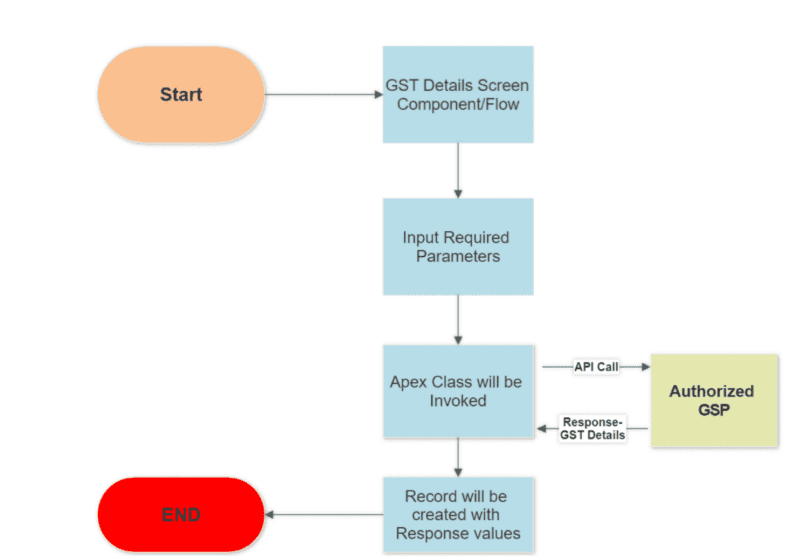
Figure 1. End-to-end request flow: Screen Flow/LWC collects input, the Apex class calls the authorized GSP, and the response is written back to a Salesforce record.
Implementation Guide
1. Select and Onboard a GSP
Evaluate GSTN-licensed GSPs (for example, MasterGST, ClearTax, Cygnet, or IRIS) on API coverage, pricing, rate limits, and support for the required endpoints, GSTIN search, return-filing status, ledger data, or e-invoice/e-way bill generation. Register and obtain a client_id and client_secret, and confirm the provider’s MFA/token-refresh flow, as this determines how the Named Credential is configured in Step 4.
2. Map the Required API Methods
Review the GSP’s API documentation and identify the endpoints required for taxpayer search, GSTR filing status, or ledger data. For each endpoint, document the required parameters, authentication header format, rate limits, and response schema. This reference is essential for building well-structured Apex wrapper classes rather than parsing responses ad hoc with deserializeUntyped.
3. Design the Salesforce Data Model
Fields should not be added directly to the Account object as a default approach. A single Account may legitimately hold multiple GSTINs, particularly for multi-state businesses, so a dedicated object structure is recommended.
Recommended object structure:
| Object | Purpose | Key Fields |
| GST_Registration__c (custom object, master-detail or lookup to Account) | One record per GSTIN | GST_Identification_Number__c (Text, External ID, unique), Account__c (Lookup), Taxpayer_Type__c (Picklist), State_Jurisdiction_Code__c (Text), Registration_Status__c (Picklist: Active/Cancelled/Suspended), Last_Synced__c (DateTime) |
| GST_Filing__c (child of GST_Registration__c) | One record per return period | Return_Period__c (Text, e.g. “072026”), Return_Type__c (Picklist: GSTR1/GSTR3B/etc.), Filing_Status__c (Picklist: Filed/Pending/Overdue), Filed_Date__c (Date) |
| GST_Sync_Log__c | Audit trail for each API call | Endpoint__c, Status_Code__c, Request_Timestamp__c, Error_Message__c (Long Text) |
Configuring GST_Identification_Number__c as an External ID field enables safe use of upsert on repeat synchronizations, avoiding duplicate records on subsequent callouts. The GST_Sync_Log__c object is recommended wherever this data informs financial or credit decisions, as it provides visibility into when a value was last confirmed and whether the most recent sync succeeded. If the integration also stores tax rate or input-credit status fields, keep those picklist values in sync with whatever the GSP currently returns, since GST rate structures and credit-eligibility rules are subject to periodic government revision.
4. Configure the Named Credential
This step should precede any Apex development, as it keeps credentials out of code and provides a consistent audit point:
- Setup → Named Credentials → New Named Credential, using Salesforce’s Enhanced Named Credential type rather than the legacy type.
- URL: the GSP’s base API endpoint.
- Identity type: Named Principal for a single shared credential, or Per User where individual Salesforce users must authenticate to the GSP separately.
- Authentication protocol: determined by the GSP, most support OAuth 2.0 client credentials or a custom header-based token. Where the GSP requires an OTP/MFA step for token issuance, that token is typically pre-fetched and cached via a scheduled Apex job rather than requested inline on every callout.
- Configure client_id/client_secret as Named Credential custom headers rather than storing them in Apex.
5. Implement the Integration Logic
For a focused use case, an Apex class with HTTP callouts referencing the Named Credential (see the code samples below) is sufficient. Where GST data must reach an ERP, a data warehouse, or multiple Salesforce orgs, MuleSoft is the recommended approach, see the comparison below.
6. Build the User Interface
A Screen Flow supports a self-service, low-code path, for example, allowing a sales representative to verify a prospect’s GSTIN during opportunity qualification. A Lightning Web Component is preferable where finer control over the user experience is required, such as inline GSTIN format validation, a loading state during the callout, or embedding results directly on the record page. In either case, the Apex method should be exposed as an @InvocableMethod for Flow, or invoked imperatively from LWC, with a single shared implementation of the callout logic.
7. Conduct Thorough Testing
An HTTP callout mock (HttpCalloutMock) should be used so that Apex tests do not depend on the live GSP sandbox. Test coverage should include:
- A successful 200 response with a complete payload
- A 200 response with a partial or missing data object (GSTIN not found)
- A 401/403 response (expired or invalid token), confirming that re-authentication is triggered rather than a silent failure
- A 429 response (rate limited), confirming that it is logged distinctly and does not trigger a tight retry loop
- Malformed JSON in the response body
- Bulk or governor-limit behavior where the Flow or trigger context may invoke the callout for more than one record at a time (batching the callouts or moving to Queueable/Future context as appropriate)
Apex vs. MuleSoft: Choosing an Integration Approach
| Apex HTTP Callout | MuleSoft | |
| Best suited for | A single, focused use case (e.g., GSTIN lookup on an Account) | GST data feeding multiple systems (ERP, Salesforce, BI) or high transaction volume |
| Setup effort | Low — a class, a Named Credential, a Flow | Higher — requires an API-led architecture, but reusable across projects |
| Monitoring and retries | Manual (custom logging) | Built in (API Manager, Anypoint monitoring, automatic retries) |
| Governor limits | Subject to Salesforce callout limits | Not subject to Salesforce callout limits |
| Recommended when | Validating the use case, or where the requirement is genuinely point-to-point | GST data forms part of a broader integration strategy |
For more on scaling beyond a point-to-point integration, see Cloud Odyssey’s MuleSoft on Hyperforce guide.
Code Sample: Retrieving Taxpayer/GSTIN Details in Apex
The following example performs a GET callout to a GSP’s taxpayer-search endpoint, parses the JSON response, and writes the relevant fields to a custom object. In production, the endpoint and credentials should be referenced through a Named Credential rather than hardcoded.
// Retrieves taxpayer/GSTIN details from a GSP and stores them on a custom object.
// Replace ‘GSP_Named_Credential’ with your configured Named Credential.
public class GstTaxpayerLookup {
public static void fetchTaxpayerDetails(String emailId, String gstin) {
Http http = new Http();
HttpRequest request = new HttpRequest();
// Named Credential handles the base endpoint + auth headers securely
request.setEndpoint(
‘callout:GSP_Named_Credential/public/search?email=’ + EncodingUtil.urlEncode(emailId, ‘UTF-8’) +
‘&gstin=’ + EncodingUtil.urlEncode(gstin, ‘UTF-8’)
);
request.setMethod(‘GET’);
request.setTimeout(15000);
HttpResponse response = http.send(request);
if (response.getStatusCode() == 200) {
Map<String, Object> responseVal = (Map<String, Object>) JSON.deserializeUntyped(response.getBody());
Map<String, Object> data = (Map<String, Object>) responseVal.get(‘data’);
if (data != null) {
Custom_GST_Detail__c record = new Custom_GST_Detail__c();
record.Taxpayer_Type__c = (String) data.get(‘dty’);
record.State_Jurisdiction_Code__c = (String) data.get(‘stjCd’);
record.Building_Name__c = (String) data.get(‘bnm’);
record.GST_Identification_Number__c = (String) data.get(‘gstin’);
record.Last_Synced__c = System.now();
insert record;
} else {
System.debug(LoggingLevel.WARN, ‘GSTIN data not found in response: ‘ + response.getBody());
}
} else {
// Log non-200 responses distinctly — expired tokens, invalid GSTIN,
// and rate-limit errors should be handled differently in production.
System.debug(LoggingLevel.ERROR, ‘GSP callout failed [‘ + response.getStatusCode() + ‘]: ‘ + response.getBody());
}
}
}
Summary of the logic: the method sends an authenticated GET request to the GSP’s search endpoint with the taxpayer’s email and GSTIN as parameters, verifies a 200 status response, deserializes the JSON body, and writes the taxpayer type, state jurisdiction code, building name, and GSTIN to a custom Salesforce object. Non-200 responses and missing data are logged for diagnostic purposes rather than failing silently.
Update from the original version
The endpoint and credentials are now referenced through a Named Credential rather than hardcoded in the class, and a timeout and structured error-path logging have been added. Both are now standard practice given GSTN’s MFA and token requirements and rate-limiting policies.
Exposing the Method to a Screen Flow
The same logic can be wrapped in an @InvocableMethod to allow administrators to incorporate it into a Screen Flow without writing code — for example, enabling sales or finance operations users to trigger a GSTIN lookup from a button on the Account page:
public class GstTaxpayerLookupInvocable {
public class Request {
@InvocableVariable(required=true) public String emailId;
@InvocableVariable(required=true) public String gstin;
}
public class Response {
@InvocableVariable public Boolean success;
@InvocableVariable public String taxpayerType;
@InvocableVariable public String errorMessage;
}
@InvocableMethod(label=’Lookup GSTIN Details’ description=’Calls the GSP to verify a GSTIN and return taxpayer details’)
public static List<Response> lookup(List<Request> requests) {
List<Response> results = new List<Response>();
for (Request req : requests) {
Response res = new Response();
try {
Map<String, Object> data = GstTaxpayerLookup.fetchTaxpayerDetails(req.emailId, req.gstin);
res.success = data != null;
res.taxpayerType = data != null ? (String) data.get(‘dty’) : null;
} catch (Exception e) {
res.success = false;
res.errorMessage = e.getMessage();
// Also write to GST_Sync_Log__c here in production
}
results.add(res);
}
return results;
}
}
Note that GstTaxpayerLookup.fetchTaxpayerDetails above would require a minor refactor to *return* the parsed data map rather than inserting a record directly. This separation, isolating callout and parsing logic from downstream handling of the result, allows the same Apex to be reused from both a Flow and an LWC without duplicating the HTTP call.
Security and Compliance Checklist
- Store GSP credentials in a Named Credential or Protected Custom Metadata; credentials should never be hardcoded in Apex.
- Design the authentication flow to accommodate the GSP’s MFA/OTP requirements rather than relying on a static token that does not expire.
- Log and alert on repeated authentication failures, as this is a reliable indicator of an expired credential rather than a routine bad request.
- Restrict field-level access to GST and financial data using Salesforce permission sets.
- Maintain an audit trail (Last_Synced__c, a related log object) for each data pull, particularly where GST data supports financial or compliance decisions.
- Revalidate HSN/SAC-to-rate mappings periodically wherever the integration touches invoicing or billing, since these values are set by the tax authority and can change independently of the Salesforce build.
Conclusion
Integrating Salesforce with the GST portal requires routing through a GSTN-licensed GSP; a direct connection is not available. For a focused use case such as GSTIN verification or return-status lookup, an Apex callout behind a Named Credential is a sufficient and appropriate architecture. Where GST data must reach an ERP, a data warehouse, or multiple Salesforce orgs, MuleSoft is the recommended approach, given the monitoring, retry, and reuse capabilities it provides. Whichever path is chosen, secure credential handling, a properly normalized data model, and thorough test coverage are what determine whether the integration holds up in production.
Cloud Odyssey works with finance and RevOps teams on this integration directly, GSP selection, data model design, and the Apex or MuleSoft build itself. Reach out if this is on your roadmap.
Frequently Asked Questions
No. The GST portal does not offer public APIs to individual businesses. The connection is established through a GSTN-licensed GST Suvidha Provider (GSP), which brokers API access to the GST System.
A GSP is a company licensed by GSTN to provide businesses with secure API access to GST System functions, including return filing, ledger data, e-invoicing, and e-way bills. MasterGST, ClearTax, Cygnet, and IRIS Business are examples of currently licensed GSPs.
Both are viable. Apex callouts are appropriate for a single, lightweight use case such as a GSTIN lookup. MuleSoft is the better fit where GST data must reach multiple systems or where built-in retries and monitoring are required.
A separate custom object (e.g., GST_Registration__c) related to Account is recommended. Businesses frequently hold multiple GSTINs across states, and a dedicated object supports External ID upserts and a clean synchronization audit trail.
In a Named Credential (or Protected Custom Metadata), never hard-coded in Apex. This keeps secrets out of source code and gives the integration a single, auditable point of authentication configuration, including support for token-refresh or OTP steps the GSP may require.
Keep callouts out of trigger context where possible, batch requests instead of firing one per record, and move bulk or asynchronous lookups to Queueable or Future Apex rather than synchronous callouts in a loop.