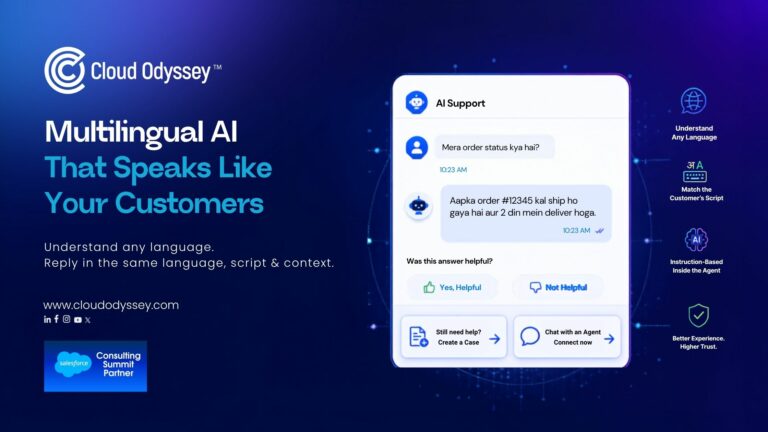

A customer types “Mera order status kya hai” into a support chat. Any competent translation system will tell you that’s a Hindi sentence about an order. Almost none of them will notice that the customer wrote it in English letters, not Devanagari script, and that the reply needs to come back the same way. That gap, between getting the language right and getting the format right, is where most “multilingual” AI agents quietly lose the customer’s trust, and it’s mostly invisible in a demo, because demos rarely use messy, real customer language.
Customers don’t write in clean, single-language sentences. They switch mid-message, drop in English brand names, and very often type Hindi (or Tamil, or Bengali, or Marathi) using the Roman alphabet, because that’s what their keyboard defaults to and what they’re used to typing on WhatsApp. “Mera order status kya hai” is about as ordinary as a customer message gets. It just doesn’t fit the box most translation pipelines were built to expect.
What We Tested Inside Salesforce
We ran a small, deliberately narrow test to see exactly where this breaks: an AI agent retrieving order details, built two different ways.
The first version sat a translation layer in front of the agent, using Bhashini, the government-backed language translation platform. It detects the input language, translates internally, processes the request, and translates the response back out. For clean-language traffic, this holds up fine.
Feed it “Mera order status kya hai,” though, and here’s what happens: it correctly identifies the sentence as Hindi; detection isn’t the problem; then it translates the reply into native Devanagari script, even though the customer typed in Roman letters. The order status comes back accurate. The language is technically correct. The customer, who wrote in the script they always use, gets an answer in a script they’d have to actively work to read. By most translation metrics, that’s a pass. By the only metric that matters to the customer, it isn’t.
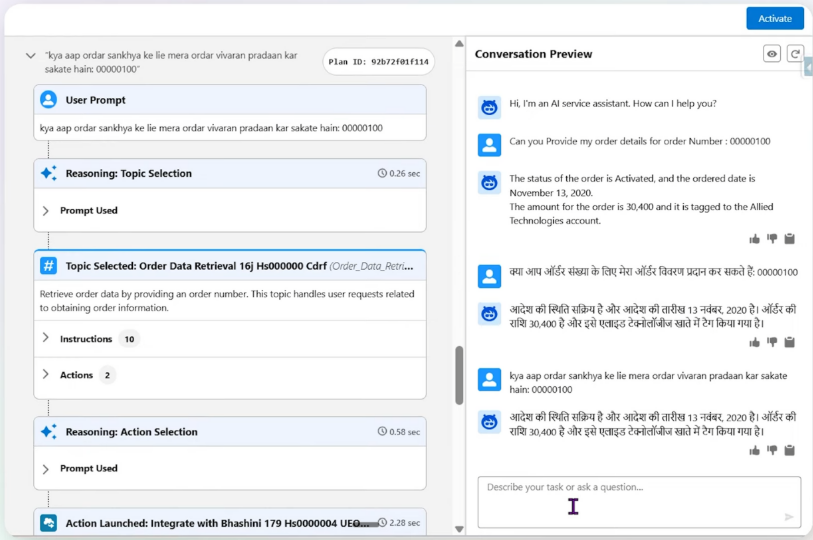
Agentforce test using the Bhashini translation layer: a Roman-script Hindi query (“kya aap ordar sankhya ke lie mera ordar vivaran pradaan kar sakate hain”) comes back correctly answered, but in native Devanagari script instead of the Roman script the customer typed in.
The second version dropped the external translation step and rebuilt the logic directly inside the agent, using instruction-based design in Salesforce Agentforce rather than a translate-then-respond pipeline in front of it. Instead of asking “what language is this,” the agent is instructed to resolve language, script, and intent together, as one decision, and carry that combination through to the response. Practically, that means the agent:
- Replies in English when the customer writes in English
- Replies in Hindi when the customer writes in Hindi
- Replies in Roman-script Hindi when the customer writes in Roman-script Hindi
Same order-status question, same underlying lookup, but the answer now comes back in the format the customer used to ask.
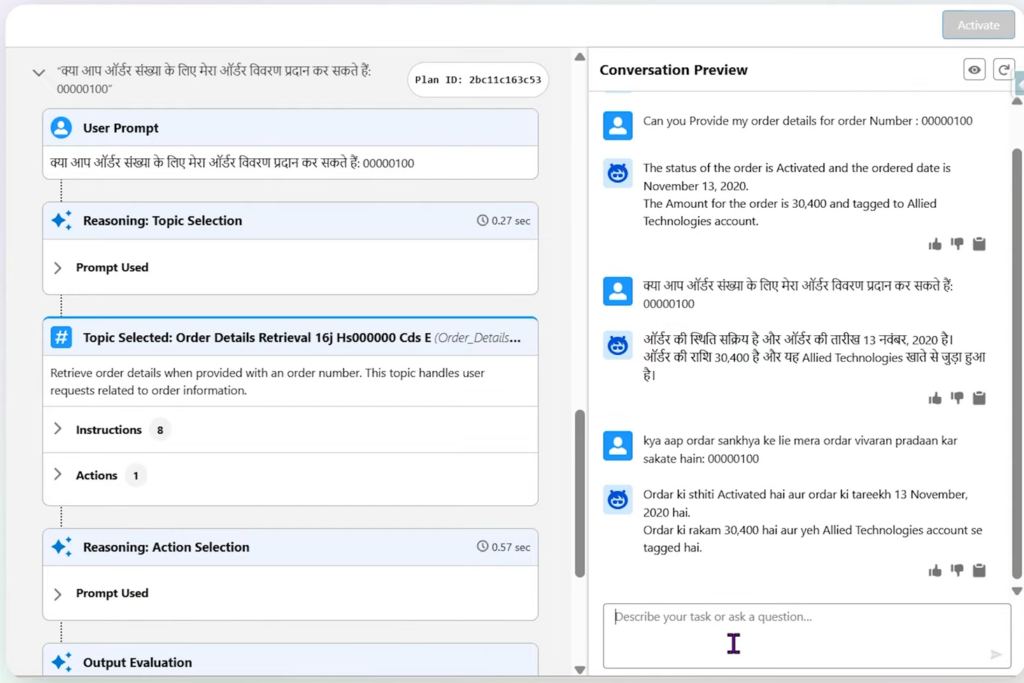
Same Roman-script Hindi query, answered by the instruction-based Agentforce design: the reply now comes back in Roman-script Hindi, matching how the customer actually wrote.
| Translation-layer agent | Instruction-based Agentforce design | |
| What gets detected | Language only | Language, script, and intent together |
| Where the logic sits | An external platform (e.g. Bhashini) in front of the agent | Inside the agent’s own instructions |
| Roman-script Hindi query | Correct meaning, wrong script (defaults to Devanagari) | Correct meaning, matching script |
| Extra processing hop | Yes — detect, translate, process, translate back | No — resolved in one pass |
| What “correct” means | Linguistically accurate | Linguistically accurate and format-matched |
Why the Fix Belongs Inside the Agent, Not in Front of It
A translation layer’s job ends the moment it produces a grammatically correct sentence in the target language. It was never asked to preserve how the customer chose to write, so it doesn’t, that’s not a flaw in Bhashini or any comparable tool, just outside the scope of what a translation step is built to do.
An agent built with instruction-based logic doesn’t have that ceiling, because script isn’t bolted on afterward; it’s resolved in the same pass as intent and meaning. That’s the part worth taking seriously when scoping an Agentforce rollout for an Indian or multi-market customer base: the fix isn’t a smarter translation API, it’s writing instructions that treat “how the customer communicates” as a requirement on the same level as “what the customer wants.”
It also travels past this one use case. The same instruction pattern applies to any Service Cloud or Agentforce interaction where customers might reasonably type in mixed script, billing questions, account queries, delivery updates because what’s being matched is a communication pattern, not a specific intent.
What This Looks Like Once It’s in Production
Instruction design like this doesn’t replace the case for automating support with AI agents, it’s what makes that automation actually land for markets where English-only, single-script assumptions quietly exclude a large share of customers. CurrencyFair’s Agentforce rollout is a useful data point here, even though language wasn’t the variable being tested: once routine queries were handled autonomously, resolution time on those queries dropped to under 60 seconds, without adding headcount. Multilingual, format-matched instruction design is the same principle applied one layer earlier, it’s not enough for the agent to resolve the query fast if the customer has to decode the reply first.
There’s a parallel worth drawing to how we think about case deflection design in Salesforce more broadly: a technically correct answer that doesn’t match how the customer asked isn’t a resolved interaction. It’s a resolved interaction that reads as unresolved, and it usually shows up later as a repeat contact or a quietly falling CSAT score nobody can immediately explain.
Where This Extends Beyond Hindi and English
Roman-script transliteration isn’t a Hindi-specific quirk. It’s common wherever a regional script coexists with an English-first keyboard habit: Tamil, Telugu, Bengali, Marathi, Arabic, and several Southeast Asian languages all show the same pattern in customer messages. If you’re building for a single-market audience today but expect regional expansion, design the instruction layer to generalize past one language pair from the start, rather than retrofitting it later.
What to Get Right Before You Build This
Test with real customer messages, not clean single-language samples. The gap between “Mera order status kya hai” and a textbook Hindi sentence is exactly the gap that decides whether this works, and it won’t show up in a test set built from formal language.
Treat script-matching as a requirement, not a polish item. A linguistically correct answer in the wrong script still reads to the customer as “this system didn’t understand me,” even when it technically did.
Keep the logic inside the agent’s instructions where you can, rather than stacking a translation service in front of it. Resolving language, script, and intent in one pass is both faster and more accurate than resolving them in sequence.
Build for more than one language pair from day one if regional expansion is even a possibility, the instruction pattern generalizes cheaply now and expensively later.
Most of the market still treats multilingual AI support as a translation problem: pick a good translation API, plug it in, move on. We don’t think that’s where the real work is anymore. Translation quality has gotten good enough that it’s rarely the thing failing your customers, script and format mismatch is, and that’s an instruction design problem, not a language coverage problem. It’s also the part vendors talk about least, because “we added 12 more languages” is a cleaner headline than “we taught the agent to notice how you actually type.”
For businesses building AI agents for Indian or other multi-script markets, we’d rather start with a narrow, honest test, a handful of real customer messages, not curated ones, than a language-coverage checklist. It tells you faster whether the agent will actually work for the customers you have, not the customers a demo assumes you have.
If you’re scoping a multilingual Agentforce rollout, talk to our team about testing it against your real query mix before you commit to an architecture.
Frequently Asked Questions
Not by default. Base language detection identifies Hindi correctly, but without specific instruction design, Agentforce will default to native script for the response. Matching Roman script requires building that behavior into the agent’s instructions.
No. Bhashini is a valid approach for standard single-language scenarios, but it isn’t required. Instruction-based agentic design handles language, script, and intent inside Agentforce directly, without an external translation layer in front of it.
No. Roman-script transliteration is common across many Indian languages and several languages outside India as well. The same instruction-based approach applies wherever customers write one language using a different script.
Generally the opposite. Removing an external translation step and resolving language, script, and intent inside the agent’s own instructions reduces the number of processing hops rather than adding to them.
Build a test set from real, unedited customer queries, specifically including mixed-script and code-switched messages, and check that responses match the script and format of the input, not just its literal meaning.