
A large jewellery retailer in India had a problem that will sound familiar to a lot of growing businesses: not a shortage of customer data, but too much of it, scattered across systems that never talked to each other. Point-of-sale, ERP, a field sales app, a service and repairs tool, a loyalty system, and the website each held a piece of the picture. Sales and service teams had no unified view of a customer. Campaigns went out disconnected from lifecycle moments that matter enormously in jewellery buying, weddings, anniversaries, festive occasions. Engagement across WhatsApp, email, SMS, and in-store visits felt like five relationships instead of one, with no consolidated reporting to show what any of it was producing.
This kind of fragmentation is common, and expensive. A MuleSoft connectivity study found the average organization runs hundreds of applications, and only a fraction are actually talking to each other. Gartner has estimated the cost of poor data quality at close to $13 million a year for a typical organization. A Salesforce multi-cloud implementation is built to close that gap, connecting Sales Cloud, Service Cloud, Marketing Cloud, and Data Cloud so every team works from one customer record instead of five. The rest of this guide walks through how the retailer’s rollout actually worked, cloud by cloud, alongside the broader model behind any multi-cloud implementation.
Salesforce Multi-Cloud Solution
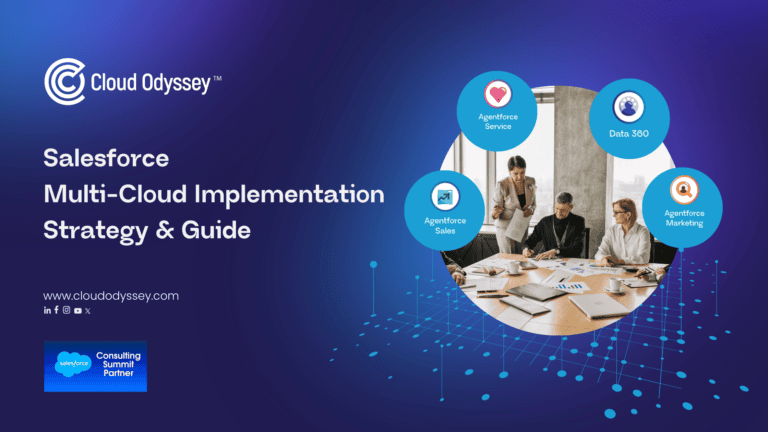
Salesforce multi-cloud implementation is the process of deploying and connecting multiple Salesforce clouds, Sales Cloud, Service Cloud, Marketing Cloud, Commerce Cloud, Data Cloud, and others- so they operate on shared data rather than as isolated systems, the way the retailer’s point-of-sale, ERP, and website did before its rollout. Each cloud is purpose-built: Sales Cloud runs the pipeline, Service Cloud handles cases, Marketing Cloud runs campaigns. Connected, they let every department work off the same up-to-date customer view, usually with Data Cloud as the layer that reconciles records across all of them. It’s a step up from a single-cloud deployment, and really an exercise in data architecture as much as software configuration: get the underlying model right, and the clouds on top behave like one system rather than several.
Why Implement Multiple Salesforce Clouds?
Few organizations set out to buy three or four Salesforce clouds on day one. It usually happens in stages: one cloud solves an urgent problem, a second team hits a related problem another cloud solves, and connecting the two becomes the obvious next move, which is roughly how the retailer’s own rollout unfolded. The benefits compound from there:
- One customer record, every department. A support agent sees deal history before a call; a rep sees open cases before pushing a renewal.
- Real lead-to-revenue visibility. Marketing traces which campaigns actually produced closed-won deals, not just clicks and opens.
- Faster, less repetitive service. Agents stop asking customers to repeat information another channel already captured, exactly the complaint the retailer’s fragmented systems used to generate.
- Less manual reporting. Unified profiles remove the spreadsheet-stitching that used to follow every campaign.
- A workable foundation for AI. Tools like Agentforce only perform as well as the data behind them, a big part of why Data Cloud tends to get built early now.
How Salesforce’s Products Work Together
Salesforce didn’t bolt these clouds together after the fact, they’re built to hand data and context back and forth, so each gets more useful once the next is added. The retailer’s own rollout followed this exact sequence.
Sales Cloud and Service Cloud are almost always the first pair connected, and the simplest, since both sit on the same core platform and object model. Native tools, Salesforce Connect, case-to-opportunity links, Flow are typically enough to keep them in sync, giving sales visibility into open cases and service visibility into deal status. For the retailer, this pairing became lead management and rep enablement on the sales side, and after-sales support, resizing, and repairs on the service side, the foundation everything else was built on.
Marketing Cloud extends that foundation outward. It runs on different infrastructure, so connecting it takes more deliberate work, usually through Marketing Cloud Connect, which syncs records and supports triggered journeys back into the CRM. The retailer used this layer for onboarding journeys and, more importantly, occasion-driven campaigns, tying outreach to weddings, anniversaries, and festivals instead of sending the same generic offer to everyone.
Data Cloud is what turned the retailer’s several useful-but-separate systems into one coherent record. Recently rebranded Data 360, it’s a real-time platform that sits alongside Sales, Service, and Marketing Cloud, pulling data from CRM records, websites, support tickets, and outside systems to build a single profile per customer, available to every connected cloud and to Salesforce’s AI agents. In the retailer’s case, this meant consolidating demographic, transactional, loyalty, and behavioral data from the point-of-sale system, ERP, field sales app, and website into one golden record.
Is Data Cloud always necessary? Not immediately. It earns its place once an organization runs three or more clouds with fragmented customer views, is investing seriously in AI, or holds large volumes of behavioral data that never made it into the CRM, all three were true for the retailer. Organizations still on one or two clouds, with a data model that hasn’t stabilized, can usually wait.
MuleSoft carries this beyond the Salesforce ecosystem itself. Sales-to-Service or Sales-to-Marketing connections can usually run on native tools alone, since they stay inside one platform. MuleSoft earns its place once the picture widens: five or more systems in play, a legacy platform needing real-time sync, or engineering hours disappearing every release just to keep point-to-point connections alive, exactly the role it played connecting the retailer’s point-of-sale, ERP, and website back into Data Cloud.
The result the retailer was building toward. Instead of a rep piecing together a customer’s history across five or six systems, the goal was one screen: loyalty tier, purchase history, preferences, and a predicted next purchase, actionable through the right channel at the right time, plus dashboards for segmentation and performance tracking across the whole rollout.
Jewellery retail is a category we know well. Cloud Odyssey built Pothys Swarna Mahal’s first ecommerce platform on Salesforce Commerce Cloud and packaged what we’ve learned into a dedicated Jewellery 360 webinar and asset covering unified store, CRM, loyalty, and referral data for jewellery brands specifically. The pattern holds across both engagements: unify the data first, then bring in each cloud in sequence, rather than launching the full scope at once.
Multi-Cloud Implementation Across Industries
The same building blocks apply regardless of industry, what shifts is which cloud tends to carry the most weight and which data sources matter most.
Retail and consumer brands, like the jewellery retailer above, lean on Data Cloud and Marketing Cloud, since so much of the relationship shows up in transactional and behavioral data across point-of-sale, ecommerce, and in-store systems, ground covered by Retail Cloud implementations. Regulated industries such as financial services and insurance need tighter integration governance and audit trails, which pushes them toward MuleSoft earlier, along with industry-specific products like Financial Services Cloud that come pre-built with the relationship modeling those sectors need.
Salesforce Multi-Cloud Best Practices
A handful of practices show up again and again across the implementations that actually go well, and are visible in the retailer’s approach above:
- Fix the data before connecting the clouds. Clean and deduplicate records before migration, a second cloud built on messy data multiplies the mess.
- Sequence by business pain, not product catalogue, and phase the rollout. Start with the cloud that solves your loudest, most measurable problem, Sales Cloud for pipeline-driven businesses, Service Cloud for support-heavy one, then stabilize before adding the next.
- Build the data layer early if AI is on the roadmap. Data Cloud is the foundation most AI features depend on.
- Get executive sponsorship and a super-user network. Adoption, not the technical build, usually decides whether a rollout sticks.
- Plan the cutover in detail. The migration itself often takes hours; the surrounding weeks of dry runs and training are what make it safe.
Finding the Right Salesforce Implementation Partner
Multi-cloud projects touch CRM configuration, data architecture, integration engineering, and change management at once, which is why most organizations bring in outside expertise, as the retailer did. That typically spans a few engagements: Salesforce consulting to map the right sequence and architecture, implementation services to build and connect the clouds, managed services to keep the system running post-launch, and a Salesforce health check if an existing org needs an honest assessment first.
Whichever partner you choose, look for one that leads with genuine discovery, mapping your systems, data, and integration landscape, rather than one that jumps straight to configuration.
Cloud Odyssey’s Point of View
We’ve built our practice around exactly the problem the retailer above needed solved. Cloud Odyssey is a Salesforce Summit Partner and MuleSoft expert, and in 2026 we were recognized as Salesforce India’s Multi-Cloud Partner of the Year, largely because this is the work we spend most of our time on: connecting CRM, commerce, marketing, and data into one system instead of several.
What we’d add, from doing this across retail, financial services, education, and manufacturing: the technical build is rarely what fails. Most stalled projects we’re brought in to fix have a data model that was never agreed on, or a second cloud launched before the first was actually adopted. The sequencing that worked for the retailer above, fix the data, sequence by pain, phase the rollout, isn’t theoretical for us; it’s the difference between projects that go smoothly and the ones we get called in to rescue.
If you’re weighing where to start your own multi-cloud rollout, or want a second opinion mid-project, talk to our team, it’s usually a shorter conversation than people expect.
Frequently Asked Questions
Licensing gives each team access to a product. Implementation is the work that makes those products behave as one system. Without an agreed data model, matching rules and integration between them, three clouds simply become three more silos under a single vendor’s logo. The value sits in the connective work, not in the subscriptions.
They solve different problems. Data Cloud (now Data 360) resolves records into a single customer profile that every connected cloud can read. MuleSoft moves data between systems, including everything outside Salesforce: ERP, point-of-sale, core banking. Organisations with mainly Salesforce-to-Salesforce needs may need neither at the start; those with fragmented customer data and several external systems usually end up needing both.
No. In most implementations those systems stay exactly where they are and are connected in, through native connectors or MuleSoft, so their data feeds the unified customer record. Replacing an operational system is a separate decision with its own business case, and it is not a prerequisite for going multi-cloud.
Tie measurement back to the problems that triggered the project. Practical measures include how many systems an agent opens to resolve one case, duplicate-record rate after deduplication, campaign-to-closed-won attribution that can now be traced end to end, hours spent each month on manual reporting, and active adoption per cloud. Agree the baselines before go-live; reconstructing them afterwards rarely works.
No. Scope drives feasibility far more than company size. A mid-sized business running two clouds on a clean data model with one or two integrations gets much of the same benefit as an enterprise programme. What makes these projects expensive is the number of source systems, the state of the data and the volume of customisation not headcount.